Select ‘Users’ from the Navigation Menu.
Highlight the user you wish to give Fault Logging Admin permissions to and select Edit.
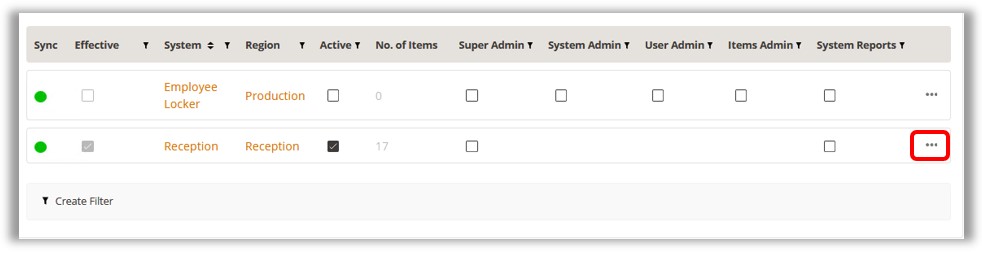
Select the System
Access tab. In the system list grid at the bottom of the page
find the system for which you want the user to have Fault Logging
Admin permissions. Click on the Ellipsis symbol to the right
of that system’s record.
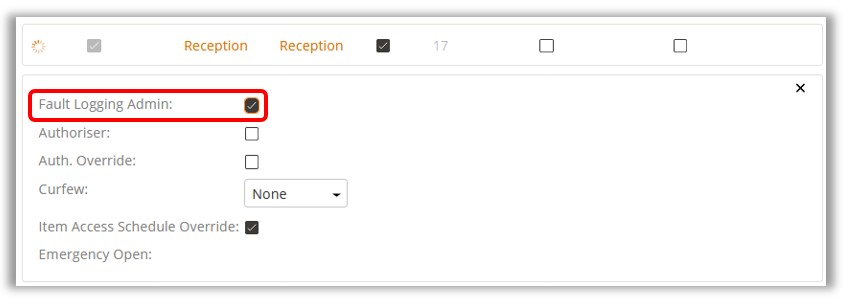
A new panel will open where you will find a Fault Logging Admin
checkbox. Tick the box.
NOTE:
The user must also have been granted access to the item in order to
take out a critically faulted item (this includes RFID tags in lockers).
NOTE: If a user, who has the Fault Logging Override
permissions, needs to access a faulty item and repair it and the system
they are accessing is either a FIFO or Advanced FIFO system, that
user also needs to have FIFO Override permissions in order to get
to the required item. For more information, refer to UD0232 FIFO and
Advanced FIFO User Guide.