Safari

When using Safari, it is recommended that you disable autofill data and also clear the browsing data.


Disabling AutoFill Data

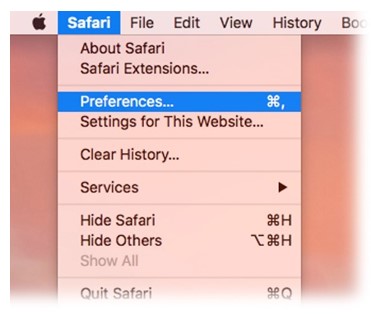
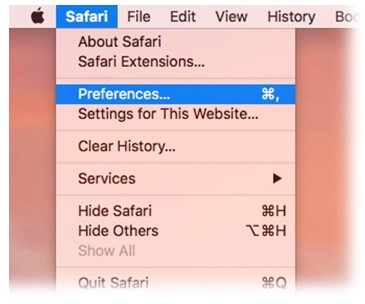
  1. With the Safari browser open, select Safari from the top of the screen and select Preferences.


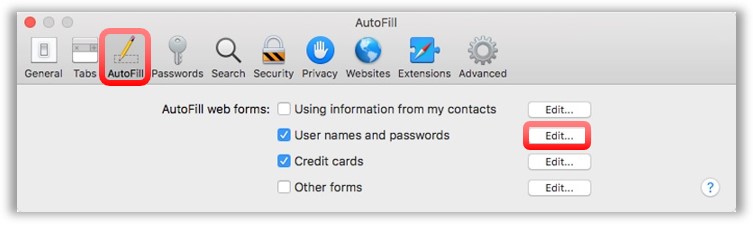
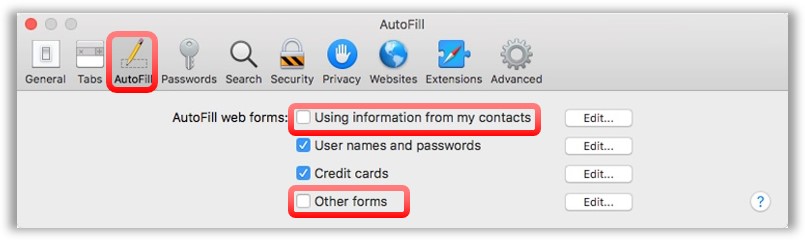
  2. A new window will open. Select the Autofill tab and if checked, select the Using information from my contacts and Other Forms check-boxes to deselect them.

  3. Once completed, close the window.

Clearing AutoFill Data

  1. With the Safari browser open, select Safari from the top of the screen and then select Preferences.


  2. A new window will open. Select the Autofill tab and if checked, select the Using information from my contacts and Other Forms check boxes to deselect them.

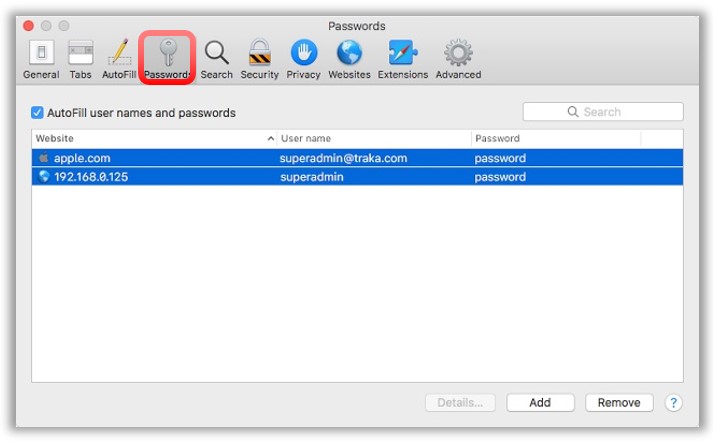
  3. Within the Passwords window, select any specific passwords that require clearing and then click on the Remove button. Once complete, close the window.


    For more information about managing usernames and passwords with Safari, refer to the Apple website:

    https://support.apple.com/guide/safari/use-autofill-ibrw1103/mac